
Unlike traditional gasoline-powered cars, Tesla vehicles do not have a traditional ignition switch or a simple “off” button. This difference often creates confusion for new owners who are used to turning a key or pressing a start/stop button before leaving their vehicle.
Many Tesla drivers ask, “how to turn off Tesla” because they want to make sure their vehicle is properly powered down, save battery energy, or understand how the car enters standby mode. The good news is that Tesla vehicles are designed to manage power automatically, making the shutdown process much easier than many people expect.
In this guide, we will explain how Tesla power management works, how to perform a proper Tesla vehicle shutdown, how to turn off different Tesla models, and what steps you can take when you want to reduce battery usage. Whether you own a Model 3, Model Y, Model S, or Model X, this complete guide will help you understand the correct shutdown process.
Content
Does Tesla Have an Off Button?
One of the biggest differences between Tesla and traditional vehicles is that there is no physical power button. Instead of manually turning the engine off, Tesla uses advanced software systems to automatically manage power.
When you park your Tesla, place it in Park mode, and leave the vehicle, it automatically reduces power consumption. The car enters a low-energy state commonly known as Tesla sleep mode.
This approach allows Tesla vehicles to:
- Reduce unnecessary battery drain
- Protect vehicle systems
- Maintain important features
- Improve overall energy efficiency
For most daily situations, you do not need to manually shut down your Tesla. The vehicle is designed to handle this process automatically.
How to Turn Off Tesla After Driving
If you are wondering how to turn off Tesla Model 3 after driving or how to shut down another Tesla model, follow these simple steps.
Step 1: Park Your Tesla Safely
Before turning off your vehicle:
- Bring the car to a complete stop
- Press the brake pedal
- Shift the vehicle into Park
Tesla vehicles automatically activate parking systems once the car is placed in Park.
Step 2: Exit the Vehicle
After parking:
- Remove your belongings
- Close all doors properly
- Take your key card, phone key, or key fob with you
Tesla recognizes when the driver leaves and begins preparing the vehicle for reduced power consumption.
Step 3: Allow Tesla to Enter Sleep Mode
Once you walk away, Tesla begins reducing active functions. The touchscreen, climate controls, and some vehicle systems gradually turn off.
This automatic process is Tesla’s version of a shutdown.
Many owners describe this as a Tesla power off process because the vehicle stops actively operating while preserving battery life.
How to Turn Off Tesla Manually Using Controls
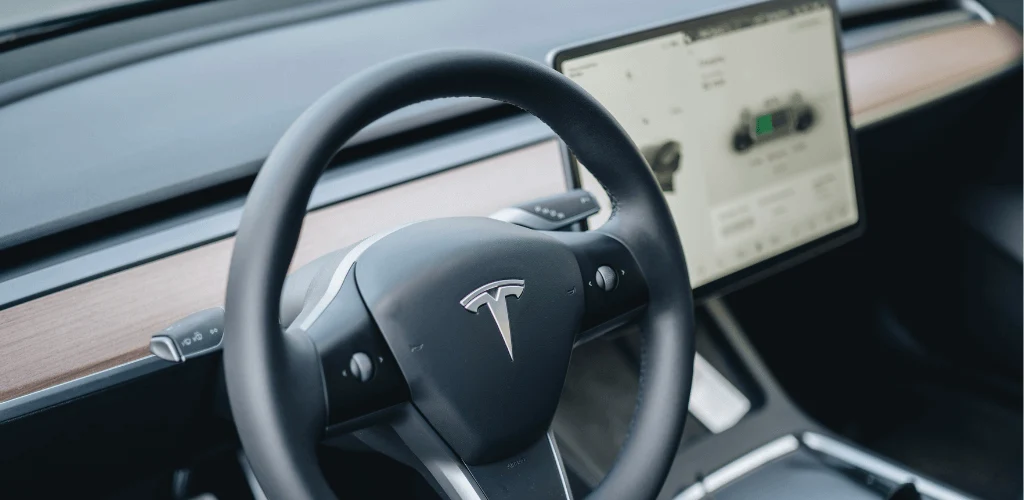
Although Tesla automatically powers down, owners can manually shut down the vehicle through the touchscreen.
Follow these steps:
- Sit inside your Tesla
- Open the touchscreen menu
- Select Controls
- Choose Safety
- Tap Power Off
After selecting Power Off:
- The vehicle disables active systems
- The touchscreen turns off
- The car enters a deeper shutdown state
This method can be useful when troubleshooting problems or when you want a complete restart.
How to Turn Off Tesla Model 3 and Model Y
Tesla Model 3 and Model Y are among the most popular electric vehicles, and many new owners search for instructions specific to these models.
How to Turn Off Tesla Model 3
The Tesla Model 3 does not require a manual shutdown after normal driving.
The process is:
- Stop the vehicle
- Shift into Park
- Exit the car
- Lock the doors
- Allow the vehicle to enter sleep mode
If you experience software issues, you can use the touchscreen shutdown option or perform a system restart.
How to Turn Off Tesla Model Y Completely
If you want to know how to turn off Tesla Model Y completely, the process is almost identical:
- Park the vehicle
- Select Park mode
- Exit and lock the car
- Wait for automatic sleep mode
The Tesla Model Y controls are designed to make vehicle operation simple, so drivers rarely need to manually power down the vehicle.
How Do I Turn Off My Tesla Screen?
A common question from owners is: “How do I turn off my Tesla screen?”
The touchscreen is one of Tesla’s main control centers, but it does not always need to remain active.
To turn off the display:
- Open the touchscreen controls
- Select the option related to display or screen settings
- Allow the vehicle to enter sleep mode
When the vehicle is properly parked and inactive, the screen automatically turns off.
Turning off the screen can help reduce distractions and slightly decrease energy consumption when the vehicle is not being used.
How to Put Tesla Into Sleep Mode
Understanding how to put Tesla into sleep mode is important for owners who want to maximize battery efficiency.
Tesla enters sleep mode when:
- The vehicle is parked
- Doors are closed
- No one interacts with the car
- The mobile app is not actively checking the vehicle
Sleep mode reduces background activity while keeping the vehicle ready for future use.
Benefits include:
- Lower battery consumption
- Improved energy management
- Reduced unnecessary system activity
However, features like Sentry Mode, climate control, and frequent app checks can prevent your Tesla from entering a deeper sleep state.
Does Tesla Turn Off Automatically When Parked?
A common beginner question is: does Tesla turn off automatically when parked?
Yes, Tesla vehicles automatically reduce power after parking.
Unlike gasoline vehicles, where turning off the engine immediately stops most systems, electric vehicles manage power electronically.
When parked, Tesla can continue running certain features, including:
- Security monitoring
- Mobile connectivity
- Battery temperature management
- Scheduled charging
This means your Tesla may not appear completely “off,” but it is actively controlling energy usage.
How to Safely Shut Down a Tesla Vehicle
Learning how to safely shut down a Tesla vehicle is especially useful when storing your car for a longer period.
If you plan to leave your Tesla unused:
- Charge the battery to the recommended level
- Disable unnecessary features
- Avoid repeatedly checking the vehicle through the app
- Park in a safe location
- Allow the vehicle to enter sleep mode
For extended storage, owners should also consider Tesla’s battery protection recommendations.
Common Reasons Tesla Owners Need to Turn Off Their Vehicle
Most drivers never manually shut down their Tesla, but there are situations where it can be helpful.
Software Problems
A shutdown can help solve:
- Frozen touchscreen issues
- Connectivity problems
- Minor software glitches
Battery Management
Owners may want to reduce power usage when:
- Leaving the vehicle unused
- Traveling without access to charging
- Storing the car
Preparing for Service
A complete shutdown may be useful before maintenance appointments or troubleshooting.
Real-Life Case Study: A Tesla Owner Solving Battery Drain Issues
A Tesla Model Y owner noticed that the vehicle was losing more battery percentage than expected overnight. At first, they assumed there was a battery problem.
After reviewing the vehicle settings, they discovered that several features were preventing the car from entering proper sleep mode:
- Frequent mobile app checking
- Sentry Mode enabled at home
- Continuous climate monitoring
The owner adjusted these settings, stopped unnecessary app checks, and allowed the Tesla to enter Tesla sleep mode.
Within a few days, overnight battery loss decreased significantly.
This example shows that understanding Tesla vehicle shutdown behavior is often more important than manually turning the car off.
Tesla Shutdown Tips for New Owners

Here are some practical tips every Tesla owner should know:
Avoid Constant App Checking
Opening the Tesla app frequently wakes the vehicle and increases energy usage.
Use Features Wisely
Functions like Sentry Mode and climate controls are useful but consume additional battery power.
Learn Your Tesla Settings
Understanding Tesla driver controls, charging settings, and energy options helps improve ownership experience.
Keep Software Updated
Tesla regularly improves vehicle operation through software updates, so keeping your vehicle updated can prevent unnecessary issues.
Final Thoughts
Understanding how to turn off Tesla is much easier once you understand how electric vehicles manage power. Unlike traditional cars, Tesla vehicles are designed to automatically handle shutdown through intelligent software.
For everyday driving, simply parking, leaving the vehicle, and allowing it to enter Tesla sleep mode is usually enough. Manual shutdown options are mainly useful for troubleshooting or specific situations.
By learning your Tesla’s controls, settings, and energy management features, you can improve battery efficiency and enjoy a smoother ownership experience. Whether you drive a Model 3, Model Y, Model S, or Model X, Tesla’s smart shutdown system is designed to make electric vehicle ownership simple and convenient.
Frequently Asked Questions About Turn Off Tesla
How do you completely turn off a Tesla?
You can use the touchscreen Power Off option, but normal parking automatically puts Tesla into a low-power state.
Can Tesla turn off by itself?
Yes, Tesla automatically reduces power when parked and unused.
How long does Tesla stay on after parking?
Tesla remains available for features like connectivity but gradually enters sleep mode when inactive.
Does turning off Tesla save battery?
Yes, reducing active features and allowing sleep mode can help minimize battery usage.
Can I restart my Tesla after turning it off?
Yes, Tesla systems can be restarted through touchscreen controls or steering wheel reset procedures.

Safety is Mark’s top priority. His blog isn’t just advice; it’s a guardian angel for drivers. Stay informed about the latest safety features, and drive with confidence, knowing Mark has your back.